FAQ
Frequently asked questions about Google Customer Reviews for WooCommerce.
General Questions
What is Google Customer Reviews?
Google Customer Reviews is a free program that allows Google to collect valuable feedback from customers who've made a purchase on your site. The program helps you get seller ratings that can appear with your Search ads and Shopping ads, as well as on your Google Merchant Center account.
Is this the same as Google Reviews?
No, Google Customer Reviews is different from:
- Google Business Reviews — Reviews for physical business locations
- Google Product Reviews — Reviews for specific products (though GCR can contribute to these)
- Third-party review platforms — Like Trustpilot, Reviews.io, etc.
Google Customer Reviews specifically collects feedback about the shopping experience from your online store.
How much does Google Customer Reviews cost?
The Google Customer Reviews program itself is free from Google. Our plugin provides the WooCommerce integration to participate in the program.
Do I need a Google Merchant Center account?
Yes, you need an active Google Merchant Center account to participate in Google Customer Reviews.
Reviews and Ratings
How many reviews do I need for a seller rating?
Google typically requires approximately 100 reviews collected within the past 12 months before your seller rating will appear in ads. This threshold may vary by country.
How long does it take to get a seller rating?
This depends on your order volume and opt-in rate. If you process 100 orders per month and 30% opt in, you could reach 100 reviews in about 3-4 months.
Can I see the reviews customers submit?
You can see your aggregated rating in Google Merchant Center, but individual reviews are not publicly displayed or accessible to merchants.
Can I respond to reviews?
No, Google Customer Reviews doesn't provide a mechanism for responding to reviews. The reviews are used to calculate your seller rating, not for public display.
Will bad reviews hurt my rating?
Yes, all reviews contribute to your seller rating average. However, a few negative reviews among many positive ones will have minimal impact.
How do I check if I have a store rating?
To find out if you have a store rating, edit the following URL to replace {your website} with your homepage URL:
https://www.google.com/storepages?q={your website}
or with a specific country:
https://www.google.com/storepages?q={your website}&c={country code}
You'll be able to view information about your store and store ratings if your site meets the minimum store rating thresholds.
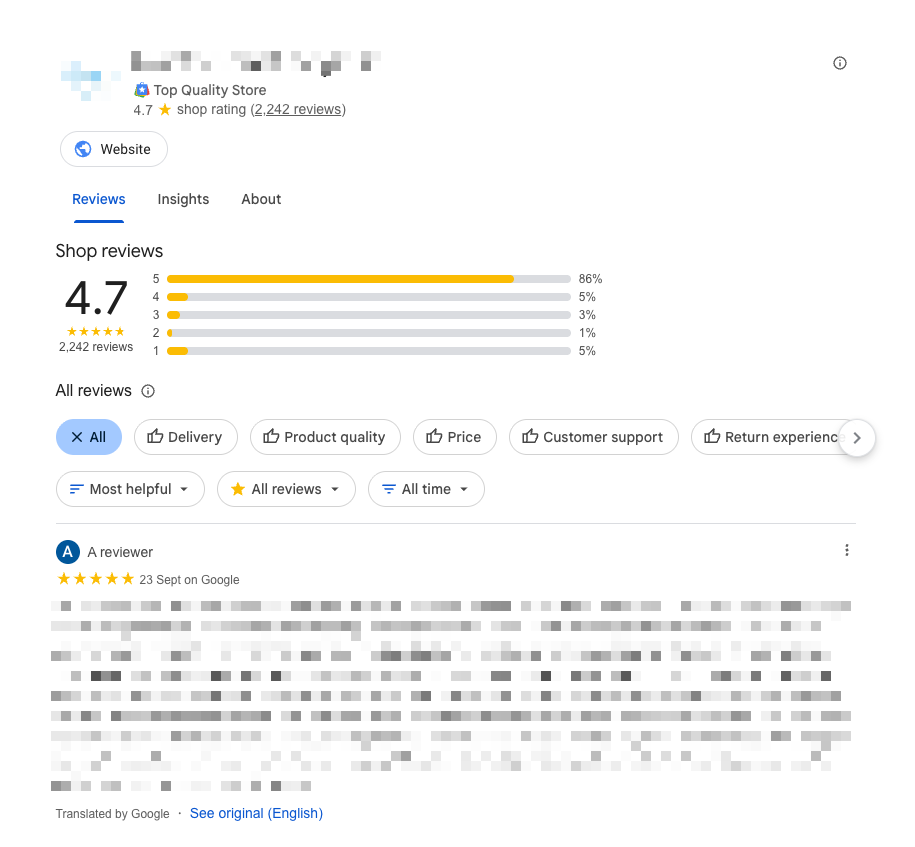
Example of the Google Store Pages report showing opt-ins, reviews, average rating, and review text
Multiple countries: If your website domain varies by country, repeat the above step for each variation. If your site uses the same domain across countries and has reviews in multiple countries, the above URL will return a page for one country. You can edit the country code in the browser URL to view other countries. For example, if the URL contains c=AU you can update this to c=US to view ratings for the US.
If Google doesn't have information for your store or if it doesn't meet the minimum store rating thresholds, a store ratings page may not load for your homepage. Additionally, an invalid URL value or the wrong homepage may prevent a store ratings page from loading. Having a store rating associated with your domain doesn't necessarily mean your store rating will show on ads, since store ratings on ads depend on auction dynamics and other factors.
What is the Shop Insights Panel?
The Shop Insights Panel is a feature that displays the overall shopping experience of your shop in a concise manner on Google Search, Maps, and other Google surfaces. You can also add the Shop Insights Panel to your own website.

Displaying the quality of the shopping experience you provide helps set the right expectations with customers and gives them key information to decide whether to proceed with a purchase.
The Shop Insights Panel sources data from the Shop Quality scorecard in your Merchant Center. Based on your performance in each metric measured by the Shop Quality scorecard, the panel displays a ranking to communicate the level of shopper experience you provide.
Benefits of the Shop Insights Panel:
- Builds trust with potential customers before they visit your site
- Displays your shop quality metrics on Google Search and Maps
- Can be embedded on your own website to showcase your ratings
- Automatically updates based on your Merchant Center performance data
Technical Questions
Does this work with WooCommerce Blocks checkout?
Yes, the plugin is fully compatible with both the classic WooCommerce checkout and the new block-based checkout.
Does this work with HPOS?
Yes, the plugin is fully compatible with High-Performance Order Storage (HPOS).
What about caching plugins?
The plugin is compatible with most caching plugins. If you experience issues:
- Exclude the order confirmation page from caching
- Clear your cache after changing settings
Can I use this with other review plugins?
Yes, Google Customer Reviews can work alongside other review plugins (like WooCommerce Product Reviews). They serve different purposes:
- GCR: Collects seller ratings for Google ads
- Other plugins: Collect product reviews for your website
Survey Opt-in Questions
Where does the opt-in appear?
By default, the opt-in appears on the WooCommerce order confirmation (thank you) page, after the order details.
Can customers opt out after opting in?
The opt-in is a one-time choice at checkout. If a customer opts in, they'll receive the survey email. They can choose not to complete the survey.
What languages does the survey support?
The survey is available in multiple languages and will display in the customer's browser language (if supported by Google).
When do customers receive the survey?
Google sends the survey email a few days after the estimated delivery date you configure. This ensures customers have received their order before being asked to review.
Badge Questions
Can I display the badge before I have a rating?
The badge requires a seller rating to display. Until you have enough reviews (~100), the badge will not show any content.
Can I customize the badge appearance?
The badge uses Google's standard design. You can control placement and add CSS for the container, but you cannot modify the badge itself.
Does the badge affect page load speed?
The badge loads asynchronously and has minimal impact on page load speed.
Pricing and License
What's included in the license?
Your license includes:
- Plugin updates for 1 year
- Priority support for 1 year
- Use on the number of sites in your tier (1, 5, 10, or 25)
Can I upgrade my license later?
Yes, you can upgrade to a higher tier at any time. Contact support for a prorated upgrade.
What happens when my license expires?
The plugin will continue to work, but you won't receive updates or support. We recommend renewing to ensure compatibility and security.
Do you offer refunds?
Yes, we offer a 30-day money-back guarantee. If you're not satisfied, contact support for a full refund.

