Meta-enabled Conversions API: What the One-Click Setup Does, and What It Cannot Do

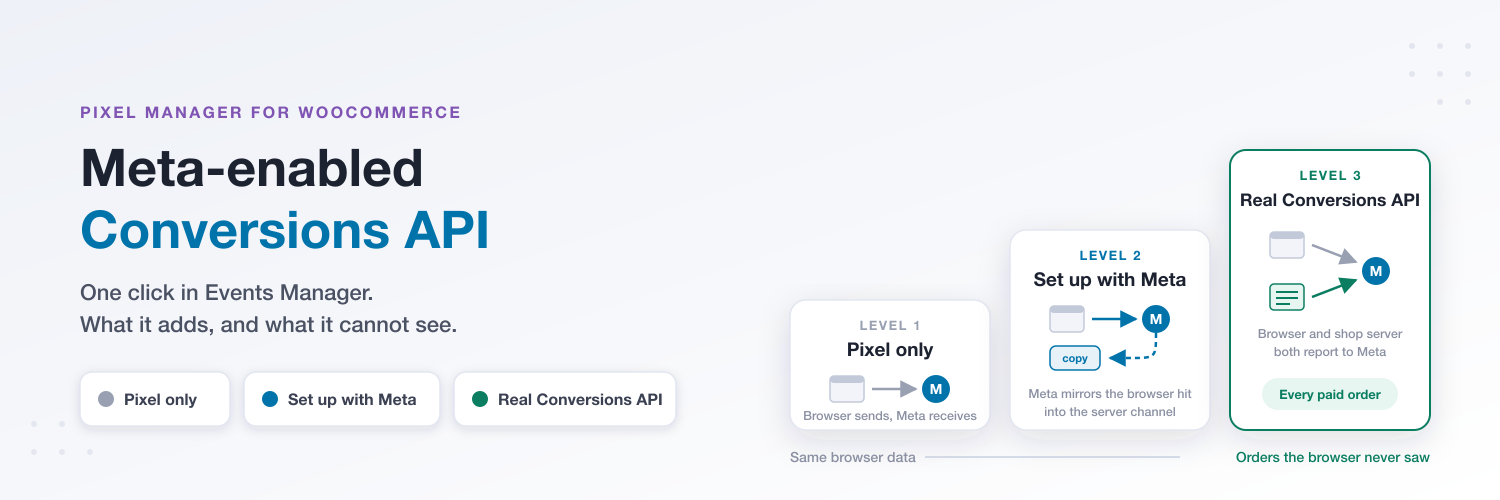
In April 2026 Meta added a new option to Events Manager: a Conversions API connection you switch on with one click, no code, no access token, no server. Meta calls it the Meta-enabled Conversions API, the button reads Set up with Meta, and it has been showing up in our support inbox ever since, usually as the question "do I still need the Pixel Manager's Conversions API if Meta now does this for free?"
The short answer is that the new option is a real improvement over a Pixel-only setup, it is safe to switch on, and it is not the same thing as a Conversions API integration that sends events from your shop server. This article explains what it does, how it does it, and where each of the three levels of Meta tracking fits.
TL;DR
- What it is: Meta takes every event your browser Pixel already sends and writes a second copy of it into the server channel, on Meta's own infrastructure. Browser and server copies are deduplicated automatically.
- What it adds over a Pixel-only setup: the events run through the Conversions API processing path, which is where Meta applies its server-side matching and modelling. If all you have is a Pixel, switch it on.
- What it cannot do: it cannot report anything the Pixel never sent. Ad blocker, declined consent, a tab closed before the thank-you page, an order paid by bank transfer three days later: no browser hit, no copy.
- Is it risky? Not for your conversion counts, as far as we can see, and there is a two-minute check in Events Manager that proves it for your dataset. The intake columns get harder to read, and you have no say over which parameters are mirrored.
- If you already run a real Conversions API, through the Pixel Manager directly or via SweetCode Cloud, the new option adds no recovered orders. Meta's own words: nothing changes for you.
What Meta shipped
Meta announced the feature on April 15, 2026, together with an AI-based Pixel enrichment feature, as "a one-click option that requires no technical expertise, no costs, no ongoing maintenance". It reached Events Manager accounts over the following weeks; the first practitioner reports of the button appeared around April 27. You find it under Events Manager → Connect data → Web → your dataset → See other ways to set up → Set up with Meta. If that last option is not there for your dataset, the rollout has not reached your account yet; we have seen accounts where it is still missing.
Meta's help center description is deliberately short. It is a web-only setup that creates a server-side connection delivering web data to Meta alongside your Meta Pixel. Every event and every parameter the Pixel already sends is mirrored through that connection, and browser and server events are deduplicated automatically. And for everyone with an existing setup, the announcement is explicit: "If you're already using a partner integration or have a custom Conversions API setup, nothing changes."
That description is accurate, and it also tells you everything important once you read it closely. The connection delivers web data. It runs alongside your Meta Pixel. There is no code, no endpoint and no access token, so the only place the mirroring can happen is inside Meta's own infrastructure, after your Pixel has already fired.
How it works, technically
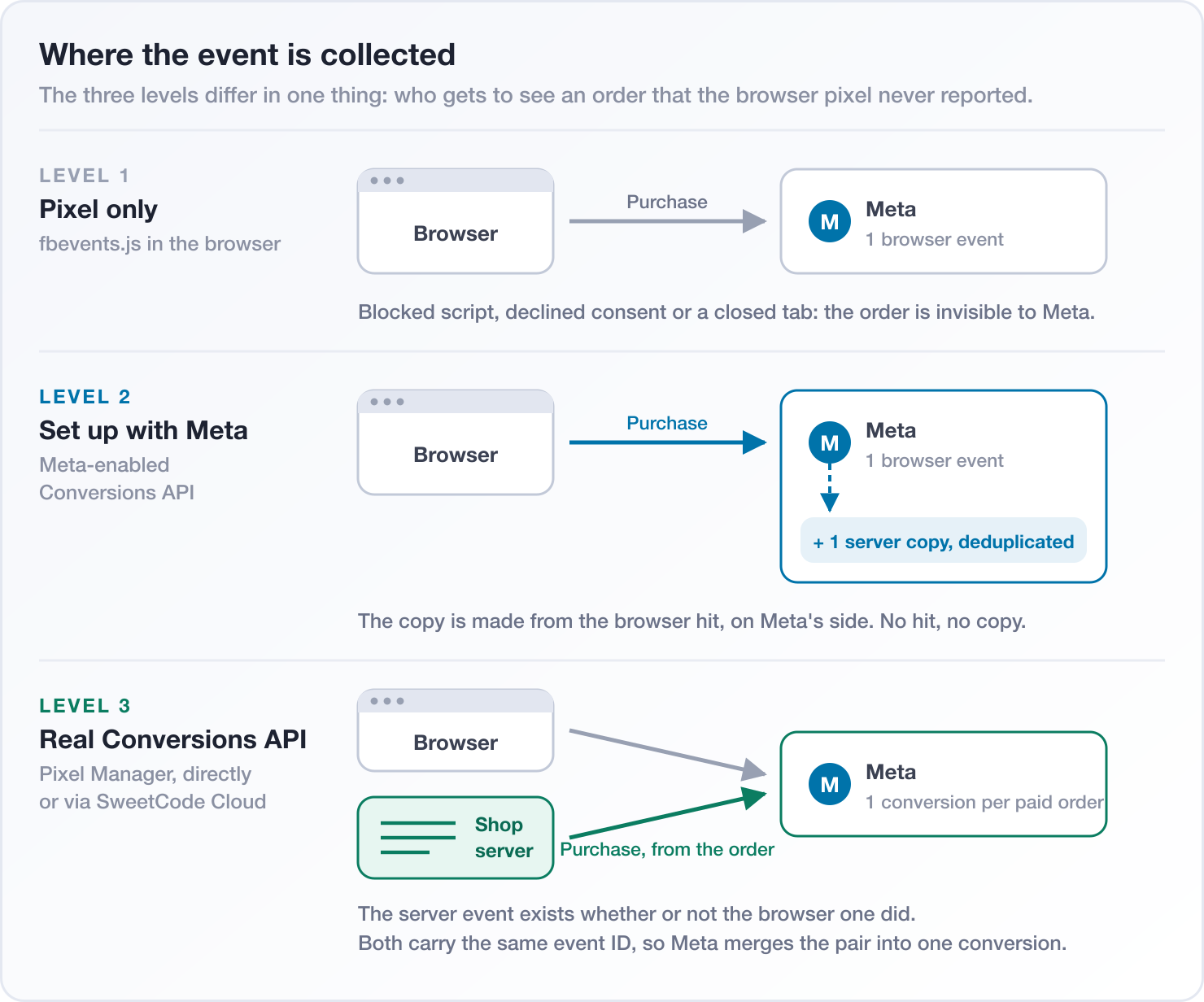
The flow for a single purchase looks like this:
fbevents.jsfires in the browser as usual and sends thePurchaseevent to Meta, with everything the JavaScript payload carries: the_fbpandfbccookies, hashed Advanced Matching fields, the value, the currency and the event ID. Meta's edge also sees the IP address, the user agent and the referrer.- Meta ingests that browser hit.
- Meta then writes a second event into the same dataset, marked as a server event and derived from the browser hit, and reconciles the two through its deduplication.
So the "server" leg is a replay of the browser leg, generated after the fact by Meta. The events show up in Events Manager under both the Browser and the Server channel, the dataset reports a Conversions API connection, and Meta's diagnostics treat the dataset as having server-side coverage. But the collection point is still the browser.
That has one hard consequence: the Meta-enabled Conversions API cannot recover anything the Pixel did not send. If an ad blocker stops fbevents.js from loading, if the visitor declines marketing consent and your consent tool blocks the tag, if the customer closes the tab before the thank-you page finishes loading, or if the request is swallowed by a DNS blocklist, there is nothing to mirror. WeltPixel's write-up puts it plainly: any session where the browser never fires an event produces nothing server-side. The order is as invisible to Meta as it was before.
It also means the mirrored event cannot carry anything the browser did not have. The Pixel Manager puts a lot of order data into its browser events, but there are things a browser event legitimately does not know: whether the payment actually completed, the final value of an order paid in instalments, or the customer's details as they stand on the order record. A real Conversions API integration takes those from your shop's database. A mirror takes them from the page.
The three levels of Meta tracking
It helps to think of Meta tracking on a WooCommerce shop as three levels. The first two collect at the same point and differ in how Meta processes the data. The third collects at a different point.
Level 1: the browser Pixel alone
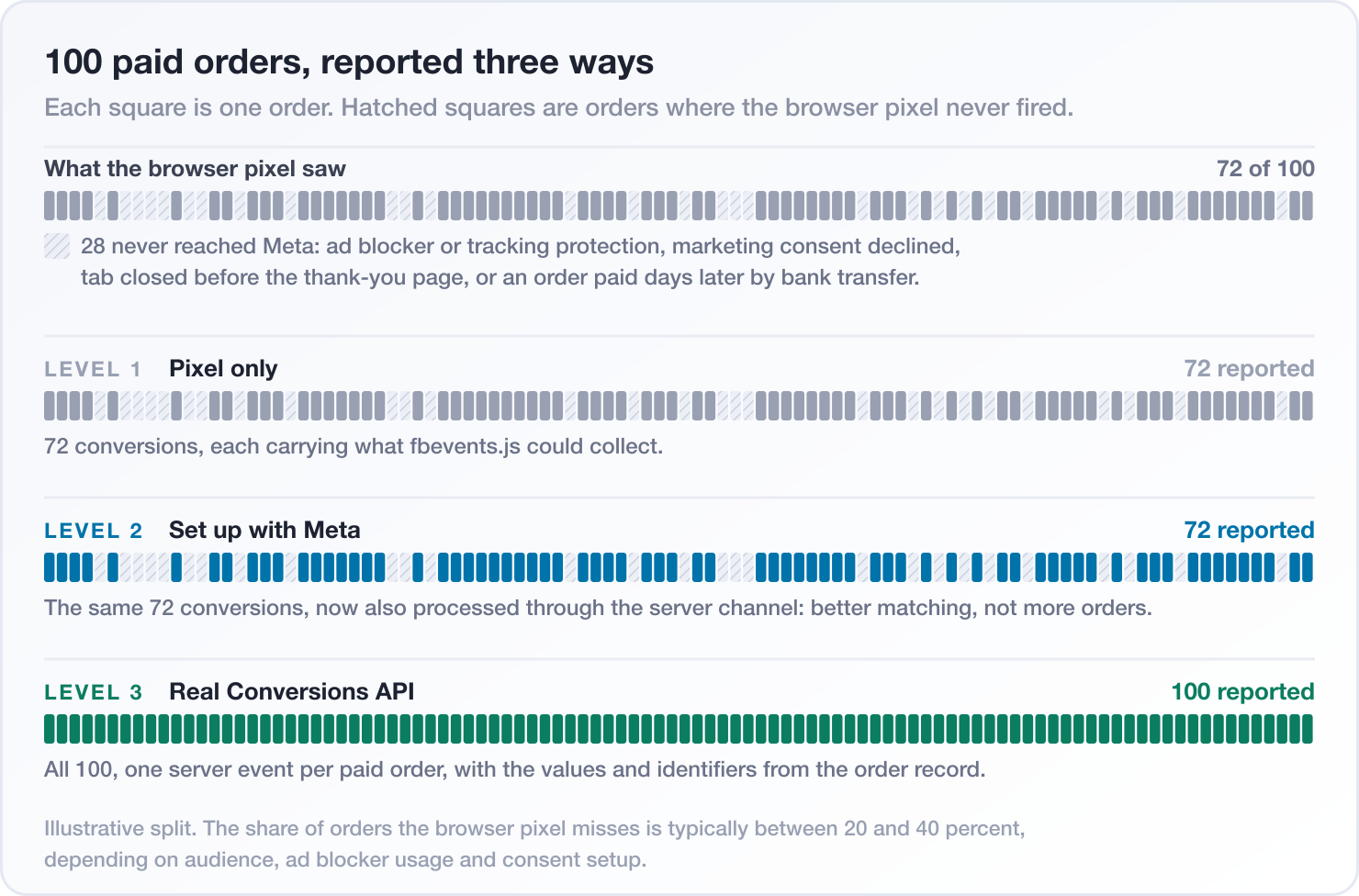
The Pixel fires from the visitor's browser and reports what it sees. It is fast, it is free, and it is the fragile half of any measurement setup. Somewhere between 20 and 40 percent of paid orders never produce a browser Purchase, depending on your audience, how many of them run ad blockers or tracking protection, how your consent banner is configured, and how many of your buyers pay by a method that confirms after the browser session is over.
Level 2: the Meta-enabled Conversions API
Same collection point as level 1, so the same orders are reported. What changes is what Meta does with them. The mirrored events run through the Conversions API path, which means Meta processes them with the signals from its own edge and applies the matching and modelling it reserves for server events. For advertisers who had nothing but a Pixel, that is a genuine step up in how well Meta can attribute and optimize.
Meta's announcement quotes a 17.8% lower cost per result for advertisers with a web Conversions API setup compared to those without. Keep in mind where that number comes from: it covers all Conversions API setups, most of which are real backend integrations that report orders the Pixel missed, and Meta gives no methodology or period for it. Applying the full figure to the mirrored variant is optimistic. The realistic expectation for level 2 is better processing of the events you already had, not more events.
What level 2 does not do:
- No additional event coverage. Orders the browser never reported stay unreported.
- No purchase events fired from the order record, so no recovery of the customer who closed the tab at the thank-you page, and no purchase for the bank transfer that clears on Thursday.
- No control over which events or which parameters are mirrored. It copies whatever the Pixel sends, all of it. Meta's own comparison of the setup options lists event and parameter selection as not configurable.
- No value corrections, no status-driven reporting, no routing to more than one dataset.
- Web only. Mobile app, offline and CRM events still need a direct or partner integration.
Level 3: a real Conversions API integration
This is what the Conversions API was built for. Your shop server, which knows about every order because it created them, sends the events to Meta itself. The Pixel Manager does this either directly from your WooCommerce server or through SweetCode Cloud, where the events are delivered from a first-party subdomain on your own domain and the outbound API calls are taken off your checkout path entirely.
What you get at level 3, and only at level 3:
- One server
Purchaseper paid order, whether or not the browser Pixel survived. This is the 20 to 40 percent of orders the first two levels cannot see, and it is the single biggest reason to use the Conversions API at all. - Purchases reported when the order is actually paid, not when a page loads. The Pixel Manager follows the order status, so a bank transfer that clears three days later is reported then, with its real value. We wrote about that in Status-Driven Meta Conversion Tracking.
- Match keys from the order record instead of from the page: the customer's email, phone, name and address, normalized and SHA-256 hashed, which is what drives Event Match Quality on the orders that matter most.
- Consent-scoped payloads. The Pixel Manager sends the server-side purchase only when the visitor's consent allows it, and withholds it otherwise, with a log entry that says why. See Server-side purchase events honor visitor consent.
- Correct values for fee lines, deposits and partial payments, and per-item bundles, taken from the order rather than from whatever the page displayed.
- Deduplication you can see. Browser and server purchase share the event ID
pmw_<order_id>, so a single order is easy to find and verify in Events Manager.
The two halves do not compete with each other. A shop that runs the Pixel Manager gets the browser Pixel and the real Conversions API from one plugin, with one event ID scheme across both.
Side by side
| Level 1: Pixel only | Level 2: Set up with Meta | Level 3: Real Conversions API | |
|---|---|---|---|
| Where the event is collected | Browser | Browser, copied by Meta | Browser and your shop server |
| Orders the browser missed | Not reported | Not reported | Reported, one per paid order |
| Works when the tag is blocked | No | No | Yes |
| Event selection | Pixel events | Not configurable, mirrors the Pixel | Full control |
| Parameter selection | Pixel parameters | Not configurable | Full control, consent-scoped |
| Match keys | What the page knows | What the page knows | What the order record knows |
| Status changes, delayed payments | No | No | Yes |
| Sources | Web | Web only | Web, app, offline, CRM |
| Deduplication | Not needed | Automatic, on Meta's side | Shared event ID, verifiable |
| Setup | Paste the Pixel ID | One click in Events Manager | Paste a Conversions API token into the Pixel Manager, or two to four developer weeks by Meta's own estimate |
Is it safe to switch on?
As far as we can see, yes. We looked for a way it could hurt your conversion counts and did not find one, and there is a check that settles it for your own dataset.
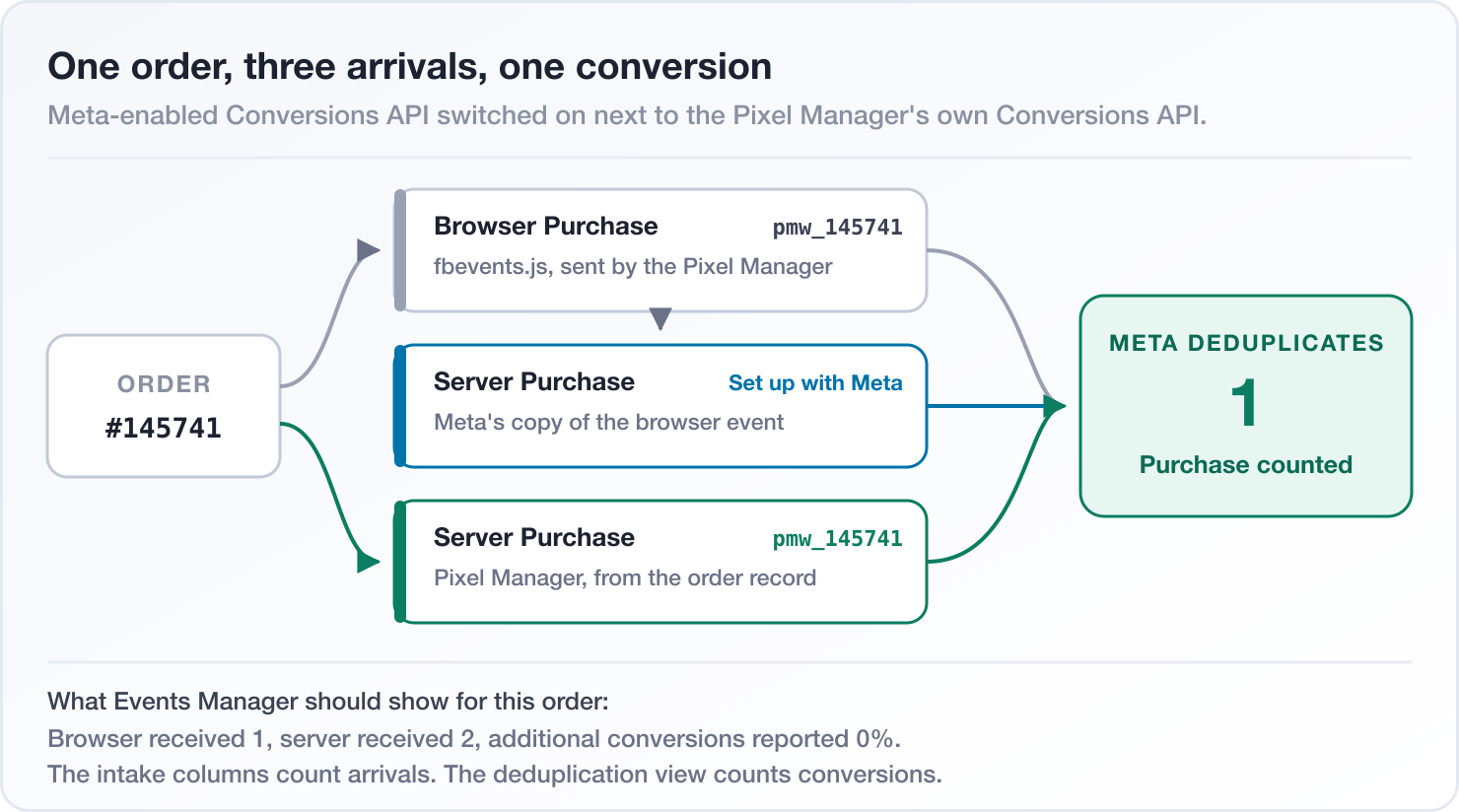
Take a shop that runs the Pixel Manager with the Conversions API enabled, and switches on the Meta-enabled Conversions API on top. A single paid order now produces three arrivals at Meta: the browser Purchase from the Pixel, Meta's server copy of that browser event, and the Pixel Manager's own server Purchase from the order record. Meta deduplicates the copy against the browser event, which is its own pipeline and its own promise. It deduplicates the Pixel Manager's server event against the browser event through the shared event ID, which is how it has always worked. The expected result is one conversion, exactly as before.
The honest caveat is that Meta has not documented which event ID the server copy carries, and the reports from practitioners who tested it next to another Conversions API stream do not all agree; some describe clean deduplication, some describe counts drifting upwards after a few days. So do not take the promise on faith. Check it. In Events Manager open your dataset → Purchase → Event match quality → Additional conversions reported. That figure is what Meta counted on top of the deduplicated events, and it is the only number that answers the question "am I being double counted". It should read 0% for Purchase before you switch the option on, and it should still read 0% a week after. If it moves, switch the option off again and the dataset is back where it was.
Three more things are worth knowing before you flip the switch, none of them a reason not to:
The intake columns change shape. The browser received and server received figures in Events Manager are raw arrival counts taken before deduplication. With the mirror active, every browser event gains a server twin, so a shop that also runs a real Conversions API will see server received land at roughly twice browser received in every hour where a browser event fired. That is the same 1:2 pattern we describe for Meta's older, self-hosted Conversions API Gateway, and it is the reason our Events Manager settings guide recommends disconnecting the Gateway on shops that run the Pixel Manager: not because it double counts, but because two server-side senders on one dataset make the intake numbers hard to reason about while adding no recovered order. The same trade-off applies to the Meta-enabled Conversions API. If you run it next to a real integration, read How to read Meta's browser-received and server-received event counts first so the ratio does not send you on a hunt for a duplicate that is not there.
You lose parameter control. Because the mirroring happens on Meta's side after the Pixel has fired, your consent gate keeps working: if your consent tool blocks the Pixel, nothing fires and nothing is mirrored. But there is no parameter filtering in this mode. Whatever the Pixel sends goes into the server channel unfiltered, and with Meta now also enriching Pixel events with AI-inferred page and product data, you have less visibility into what ends up being transmitted. Under the GDPR, joint-controller responsibility for Meta Business Tools stays with you as the site operator, and the courts have started putting a number on it: on February 3, 2026 the Higher Regional Court of Dresden awarded 1,500 euros per user in four parallel cases over Business Tools tracking without a lawful basis, and did not admit an appeal to the Federal Court of Justice. None of that is caused by the Meta-enabled Conversions API specifically, but a setup where you can see and scope what is sent is easier to defend than one where you cannot.
Check for a third stream. If your dataset already receives server events from somewhere other than your shop, for example a Google Tag Manager server container, a mobile app or an offline upload, check that those events carry consistent event IDs before adding another sender. Deduplication works on event name plus event ID within a 48-hour window. Two senders that generate IDs independently for the same order will not be merged.
Our recommendation, by situation
- You run the Meta Pixel and nothing else. Switch the Meta-enabled Conversions API on today. It is free, it takes one click, and it improves how Meta processes the events you already send. Then read on, because the orders it cannot see are still not being reported.
- You run the Pixel Manager without a Conversions API token. Switching on the Meta-enabled option is fine and gives you the same processing improvement. Adding the Conversions API token gives you the missing 20 to 40 percent of orders and status-driven purchases, which no click in Events Manager can.
- You run the Pixel Manager with the Conversions API, directly or through SweetCode Cloud. You already have everything the Meta-enabled option offers and a great deal it does not. Switching it on gains you no order and mostly changes the shape of the intake columns. Our default advice is the same as for the Conversions API Gateway: keep the real integration, and do not add a mirror unless you have a reason to. If you do add it, watch Additional conversions reported for a week.
- You run a server-side tag manager or another partner integration. Keep it. The mirrored stream and a real Conversions API stream are not substitutes; they collect at different points in the funnel. Verify event ID consistency before running both.
Setting up the real thing
If you have decided on level 3, the Pixel Manager makes it two fields:
- Create a Conversions API access token in Events Manager, following Meta's instructions.
- In WordPress, go to WooCommerce → Pixel Manager → Tracking Pixels → Meta and paste it into the Conversions API Token field.
From that moment on, every paid order produces a server-side Purchase from your shop, with the same event ID as the browser event. If you want the events delivered from the edge instead of your web server, connect SweetCode Cloud; it takes a CNAME record and a free account.
While you are in Events Manager, take five minutes for the Events Manager settings that quietly corrupt conversion data on shops with a proper implementation: automatic events, the Event Setup Tool and the Conversions API Gateway.
Availability
The Meta Conversions API is a Pro feature of the Pixel Manager and has been since version 1.10. Status-driven purchases and consent-scoped server-side sends are included. SweetCode Cloud requires the Pro plans sold on sweetcode.com, version 1.57.0 or later.
Not on Pro yet? Have a look at what Pro unlocks or go straight to the pricing.
Interested to get updates?
Sign up to our monthly newsletter today.Happy tracking! 🎯

