Development Update August 2026 (#15)

TLDR
- Eight new tracking platforms: OpenAI, Mixpanel, Criteo, Nextdoor, Hyros, Triple Whale, Microsoft Clarity and GroundTruth, plus a new Attribution category
- Nova is now the default interface on every install, with a guided setup that confirms your first tracked order
- Deposits and partial payments are finally counted as one sale, for the full amount, instead of one conversion per instalment
- Carts changed server-side (funnel builders, persistent carts, auto-added products) are now visible to the browser events, so checkout steps stop reporting a value of 0
- Conversion values were corrected for fee lines, amount-only refunds, per-item bundles and the Google Ads adjustments feed
- An unanswered cookie banner is no longer read as consent on Cookie Script, Complianz and iubenda
- A jQuery-free event API (
pmw.bus) and a rebuilt tracking library core, with a snapshot test suite that pins every pixel payload - 17 releases, 27 new features, 80 improvements and 70 bug fixes between 1.58.10 and 1.65.1
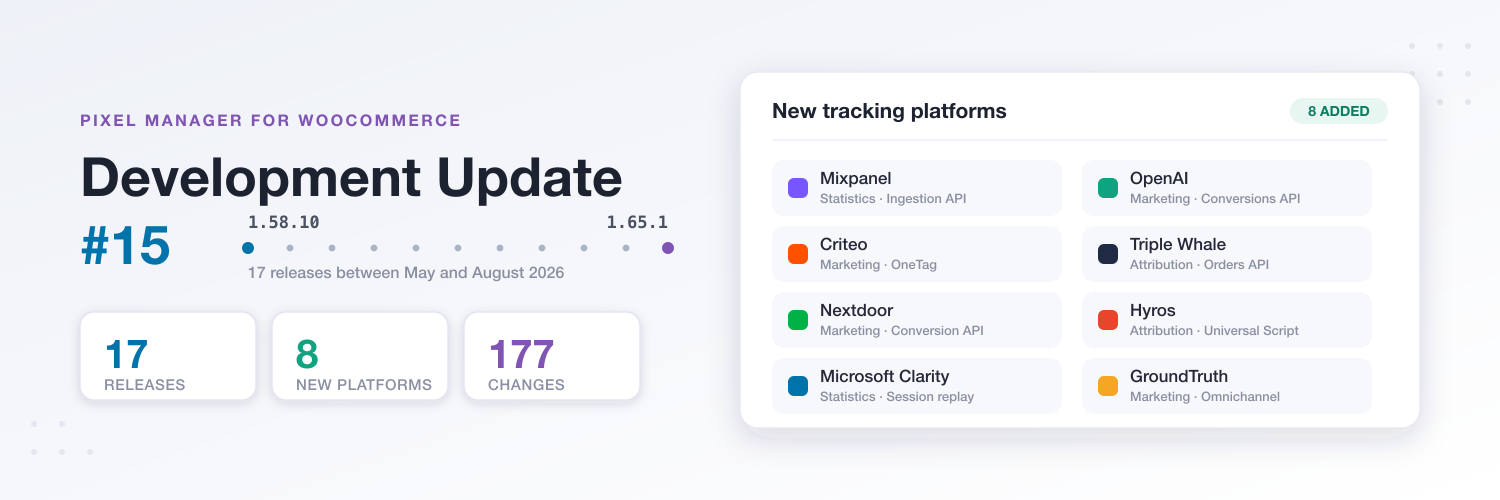
Our last development update went out in April, at version 1.58.9. Since then we shipped 17 releases and 177 changelog entries. This is the guided tour: the big things first, then the interesting engineering, then the fixes that were worth the trip.
Eight New Tracking Platforms 🛰️
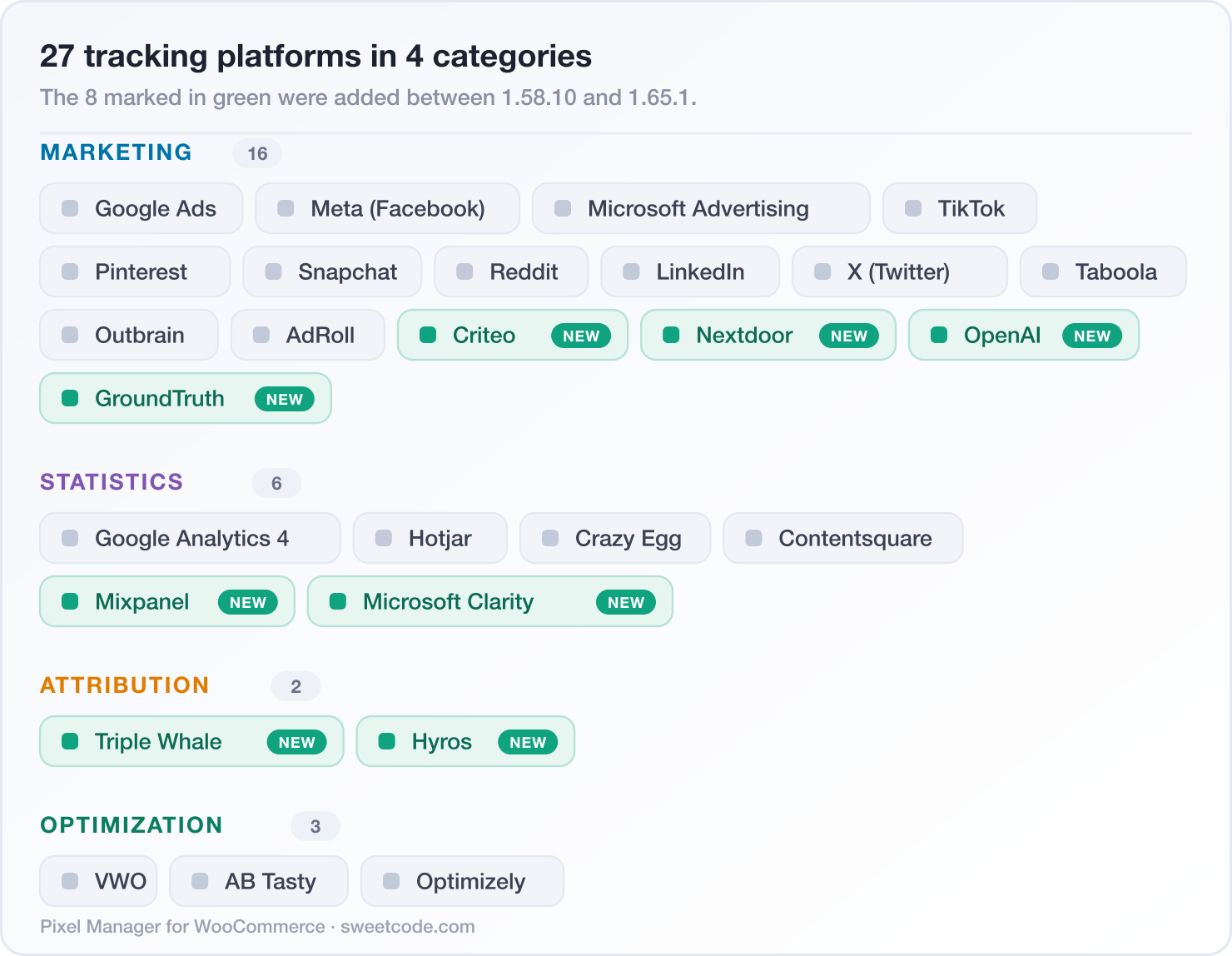
The single biggest change in this cycle is the size of the catalog. It grew from 19 platforms to 27.
OpenAI (ChatGPT) ads
Version 1.60.0 added OpenAI as a tracking pixel, with browser-side conversion tracking, a server-side Conversions API and Advanced Matching. Version 1.64.0 added the ChatGPT click reference (the oppref URL parameter): it is captured on the landing page, carried through checkout and attached to every Conversions API event, so OpenAI can attribute the sale back to the conversation that started it. We wrote about that one separately in OpenAI ads tracking for WooCommerce.
Mixpanel
Version 1.65.0 added Mixpanel, which sends the full shopping funnel from the browser and, with the Ingestion API configured, purchases and refunds server-side. Mixpanel silently drops events that arrive at the wrong regional host, so there is a data residency setting that routes your events to the US, EU or India endpoint.
Criteo and Nextdoor
Version 1.64.0 added Criteo (the OneTag, with the whole shopping journey for retargeting and audience building) and Nextdoor (the Universal Pixel and the Nextdoor Conversion API). Both support optional advanced matching with the hashed customer email. Nextdoor's server-side events share event IDs with the browser pixel so Nextdoor deduplicates them, the ndclid click ID is captured for attribution, and the events route through SweetCode Cloud when it is connected.
Attribution as its own category: Hyros and Triple Whale
Version 1.63.0 introduced a new Attribution pixel category, which appears as its own group in the settings and follows the statistics consent category.
- Triple Whale: one toggle loads the Triple Pixel, no pixel ID needed. An optional Orders API key syncs order records including refunds server-side, which completes the attribution without handing Triple Whale access to your WooCommerce REST API.
- Hyros (1.64.0): the Universal Script, loaded consent-aware and cache-safe on every page, so it no longer has to be pasted into your theme header. Enter the product hash or paste the whole snippet, and the funnel milestones are added to the visitor journey as Hyros action tags.
Microsoft Clarity and GroundTruth
Microsoft Clarity (1.61.0) brings heatmaps and session recordings, with add to cart, begin checkout and purchase events attached so you can analyze the whole shopping experience instead of just the clicks. GroundTruth (1.63.0) covers omnichannel attribution across mobile, desktop, CTV and audio: enter the GTID from your GroundTruth representative and cart and purchase events start flowing.
The eight new platforms are Pro features. See what else Pro unlocks.
And if the platform you need is still missing, 1.60.0 added a "Request a tracking pixel" link right on the Tracking Pixels page. Several of the platforms above got built because someone asked.
Nova Is Now the Default Interface 🚀
Nova, the rebuilt admin interface, shipped in 1.59.0 as the default for new installs. With 1.62.0 it became the default everywhere: installs still on the Classic interface were switched automatically, with all settings and tracking untouched, and one click in the Support tab switches back. The interface choice is now remembered per user account instead of per browser session, so it follows you across browsers and devices.
If you have not seen it yet, the Nova introduction post has the screenshots.
What is new since that post is mostly about the first fifteen minutes with the plugin:
- An "it works" confirmation (1.61.2): after you set up your first pixel, the dashboard invites you to open your shop and turns green the moment your pixels are confirmed live on the storefront. Then it celebrates the first order that was tracked end to end. The storefront reports this exactly once, through a one-shot beacon that disables itself afterwards and sends no visitor data.
- An honest optimization score: on fresh installs it now starts at zero and grows as you complete the getting-started checklist, instead of reporting a perfect score before the first pixel exists.
- A "Did you know?" card that surfaces a different feature on every dashboard visit, with a direct link to try it. Features you already use are skipped.
- Popular platforms first: the Tracking Pixels page leads with Google and Meta, with the full catalog right below, and a labelled divider separates active from inactive pixels.
- Honest Pro labelling (1.59.2): Pro pixels group under a locked section instead of showing a misleading "active" badge, the active pixel count only counts pixels that are actually tracking, and locked fields explain whether a saved value is inactive without a license or Pro-only to begin with.
- Consent gates ask before they bite: turning on Explicit Consent Mode or Google TCF support stops every pixel until your CMP grants consent, so it now takes a deliberate confirmation that cannot be dismissed by clicking beside it.
Deposits and Partial Payments, Counted Once 💳
This one had been on the list for a long time. Deposit plugins split a single sale across several WooCommerce orders: one for the deposit, one or more for the instalments, sometimes a follow-up invoice. Every one of those orders looks like a purchase, so every one of them used to be reported as a purchase.
Since 1.65.0 the Pixel Manager understands the shape of the sale. Here is a sale of 100, split into a deposit of 30 and an instalment of 70, before and after:
Supported out of the box are Deposits & Partial Payments for WooCommerce (Acowebs) and WooCommerce Deposits (Webtomizer). For any other deposit plugin, the pmw_split_payment_order_role filter tells the Pixel Manager what role an order plays:
add_filter('pmw_split_payment_order_role', function ($role, $order) {

    if (
        $order instanceof WC_Order
        && 'my_deposits_plugin' === $order->get_created_via()
        && $order->get_parent_id() > 0
    ) {
        return 'payment_leg';
    }

    return $role;
}, 10, 2);
A payment_leg order reports the purchase with its parent order's products and value, and writes the duplication marker on the parent, so the remaining instalments of the same sale stay silent. A follow_up_invoice order never reports a purchase at all.
The Cart the Browser Could Not See 🛒
Browser events read the cart from the data layer. That works right up to the moment something changes the cart on the server without the browser noticing: a funnel builder such as CartFlows, a persistent cart restored on login, or a coupon that automatically adds a free product. The result was a begin_checkout event with an empty product list and a value of 0.
Version 1.61.1 closed that gap by watching WooCommerce's own cart hash:
That second branch matters too. When the tracked cart really is empty, Google Analytics and TikTok no longer claim a value of 0 with an empty item list. Like the Meta pixel, they send the event without the commerce fields, so the funnel step is still counted without poisoning your revenue and item reports with false zeros. In the same spirit, event parameters that are simply unavailable (the currency on a page with no shop context, for example) are now omitted cleanly instead of aborting the event or arriving as an invalid empty value.
Two more gaps in the checkout funnel got closed:
begin_checkouton direct checkout entries (1.62.1): the event now also fires when a shopper lands on the checkout page with items in the cart, which covers funnel builders, buy-now links, direct checkout links and block-based carts that never click a "proceed to checkout" button. It waits for the cart to sync so it carries products and value, fires once per checkout session, skips the order-pay page, and can be switched off with thepmw_fire_begin_checkout_on_checkout_pagefilter.add_shipping_infowithout a click (1.65.0): checkouts that pick the shipping method for the customer, CheckoutWC among them, and shipping packages that offer a single rate, were missing this step entirely because the trigger waited for a genuine click on the classic checkout form.
WooCommerce Blocks and the Interactivity API 🧩
WooCommerce is migrating its blocks from JavaScript hooks to the Interactivity API, which dispatches no such hooks. That migration quietly breaks anything that listens for them, so version 1.65.0 stopped relying on them alone:
- The Cart and Checkout blocks are now also tracked at DOM level, alongside the block JavaScript hooks, so the shipping method, payment method and place order steps keep being reported once the migration reaches them.
- The Product Collection block is tracked, and stays tracked when it re-renders. It renders without the classic WooCommerce loop hooks, so collections that do not inherit a shop, search or taxonomy query reported no
view_item_listand noselect_itemat all, and its client-side pagination and filters left the products loaded that way untracked. - Add to cart is reported for the block paths that announce a cart change without naming it. The Interactivity API cart store behind the blockified add to cart button and the Add to Cart with Options block names neither product nor quantity, so the Pixel Manager reconciles the two carts and reports the difference:
Page builders got some attention too. The pmw_output_product_data_layer_script and pmw_defer_product_data_layer_to_footer filters (1.62.1) keep view_item_list and select_item working inside builders that strip inline scripts from product loops, such as the Elementor Products widget, and 1.59.3 fixed add_to_cart not firing for variable products rendered outside a native product page, for example through the [product_page] shortcode.
Conversion Values That Match the Books 💰
A conversion value that is wrong by a few percent is worse than no value at all, because the bidding algorithm believes it. Several value bugs were fixed in this cycle, and they were all in the same family: an amount that was correct for the common case and quietly wrong for orders with an unusual shape.
| Order shape | What was reported | What is reported now |
|---|---|---|
| Subtotal mode, order with a fee line (gift wrap, cash on delivery, deposit surcharge) | The fee was deducted from a subtotal that never contained it | The subtotal, fees left out of the calculation |
| Profit margin mode, refund entered as a plain amount instead of per line item | The margin did not move at all, because the reversal was calculated from the refunded quantity | The refund is deducted from the margin |
| Partially refunded order in the Google Ads conversion adjustments feed | The refund was applied twice, so a half refunded order was restated at a quarter of its value | The corrected value, once |
| Deposit or instalment order carrying its payment as a fee line with no products | A negative conversion value, which platforms reject or misread | Never below zero |
| Product Bundles or Composite Products priced per item | A price of 0 in add_to_cart and view_item | The real bundle price |
| Bundle or composite in a purchase or cart event | The container listed alongside every child product | Counted once, at the full bundle price |
| Bundle quantity | Sometimes the quantity of the first bundled item | The bundle's own quantity field |
The lifetime value calculation got a correctness fix as well: it is now resolved per email address. When more than one address was looked up in the same request, every address after the first one received the order history of the first one.
An Unanswered Cookie Banner Is Not Consent 🔐
Three CMP integrations were too generous with consent, which is the worst kind of consent bug: it grants permission the visitor never gave.
- Cookie Script (1.65.0) writes its consent cookie already on the first page view, before it holds any decision. The mere presence of that cookie was read as full consent, so in explicit consent mode every pixel fired before the banner was answered.
- Complianz (shipping in 1.65.2, currently in beta) relays each consent category separately through the WP Consent API. A category missing from such a relay, or a missing consent cookie, was read as consent.
- iubenda (1.58.10) now applies deny-by-default fallbacks for purposes that are absent, matches the correct consent cookie, and maps purpose 3 (Experience) to preferences.
The rule the Pixel Manager now applies everywhere:
The same deny-by-default principle now survives failures, not just decisions. If the consent module itself fails to load, because an optimization plugin serves stale script chunks for instance, the Pixel Manager enforces its denied state reliably (1.61.2) instead of letting gtag.js be requested with no way to deliver a consent signal to it, and a failed consent module load no longer aborts all the tracking setup that comes after it (1.58.10).
Three more consent items worth knowing about:
- FAZ Cookie Manager support was added in 1.59.0, and 1.65.0 fixed its script whitelist, which only carried the folder name of the woocommerce.com build, so on the wordpress.org and Pro versions the banner's script blocker kept the tracking scripts from loading.
- Google Consent Mode timing (1.61.0): with Consent Mode enabled but no cookie banner present, the consent signal was applied a moment too late and Google Analytics and Google Ads could stop receiving data. It is now set before the Google tag loads.
- Partial category updates (1.65.0): categories you do not pass to
pmw.consent.categories.set()keep their current value instead of being reset. The documented consent API and the CMP integrations always pass all categories, so they were never affected.
A jQuery-Free Event API and a Platform Layer 🧱
Version 1.65.0 is the largest internal change of this cycle, and the part of it you can actually use is pmw.bus: a jQuery-free event API for site snippets and third-party integrations.
// Listen to what the Pixel Manager tracks
pmw.bus.on('pmw:event:purchase', function (payload) {
    console.log(payload.event);              // "purchase"
    console.log(payload.event_data.order);   // the order, as the pixels saw it
    console.log(payload.context.consent);    // what the visitor allowed
});

// Tell the Pixel Manager that something happened it could not detect
const product = pmw.getProductDetailsFormattedForEvent(productId, quantity);
pmw.bus.emit('pmw:add-to-cart', product);
Every documented jQuery snippet keeps working through a permanent compatibility bridge, so nothing you have written needs to change. And a purchase listener registered through pmw.bus.on() after the purchase event has already fired still receives the order, which removes the single most common race in custom purchase snippets. The details are in the command queue documentation.
Underneath, the tracking library was restructured for the multi-platform support we are building toward: the core now runs without jQuery, and all WooCommerce-specific code lives in a dedicated platform layer. None of this changes what the pixels send, and to prove it there is now a snapshot test suite that pins the payload of every pixel and fails the build on any unintended change.
One fix from the same release deserves its own mention, because the cause is so unintuitive. On shops without pretty permalinks, WooCommerce only recognizes the /wp-json/ form of a REST route. Every Pixel Manager tracking call therefore booted the entire WooCommerce frontend stack, session, cart and customer object included, and could write an outdated cart back into the session. Those shops now skip all of it.
Built for AI Agents, and for Asking Questions 🤖
Version 1.59.0 expanded the Abilities API with a machine-readable settings catalog, so an AI agent can discover, read and safely change Pixel Manager settings: pmw/get-settings-schema, pmw/get-settings, pmw/get-setup-status, pmw/update-settings and pmw/configure-pixel. Writes are validated sparse patches, they redact secret tokens, they back up the settings on every save, and the whole write side can be switched off with the pmw_abilities_allow_write filter.
On the human side, 1.64.0 added an "Ask Pixie" chat icon next to most settings, from pixel IDs and API tokens to the consent and order configuration options. It opens the AI assistant with a ready-to-send question about that specific setting, which beats searching the docs for the name of a field you are looking straight at. The admin chat itself was replaced in 1.62.1 with our new Engadin chat, which also supports voice input.
Google Tag Gateway ⚡
The Google Tag Gateway had one genuinely severe bug, fixed in 1.65.0: it read Google's "not modified" answer to a cache revalidation as a failure and replied with an error page instead of the script. From the second visit onwards, no Google tag loaded at all, and Google Analytics filed those sessions under "(not set)".
- A warning when the gateway is not behind an edge (1.61.0): enabling the gateway on a site that is not served through Cloudflare means your own server handles the traffic and carries the load. The Pixel Manager now says so once, and you can move it behind Cloudflare, keep it, or turn it off.
- The opportunity is offered to everyone who can use it (1.65.0): it used to appear only on shops detectable behind Cloudflare, which left out every shop on another CDN, while shops without a single Google tag were shown the card anyway.
- A developer ID header (1.62.1): the local proxy identifies itself to Google's first-party serving infrastructure with a dedicated header, which Google's tag platform team asked for so their support teams can recognize a Pixel Manager proxy setup when a merchant contacts them.
- The rejection log now names the request whose path was rejected. The line meant to report the original path printed the result of the rejection instead, which is always the same empty value.
Server-Side Correctness 🔌
Server-side events are the ones you cannot see in a browser console, which makes silent errors expensive. This cycle fixed a batch of them.
Google Analytics 4 Measurement Protocol
- Session identifiers were up to two days stale (1.65.0). The session ID was read once per WooCommerce session and kept for its whole lifetime, while Google Analytics starts a new session after thirty minutes. Returning customers' orders landed under "(not set)".
- Refunds carry value and currency (1.59.3): the original order total for full refunds, the refunded amount for partial ones, so GA4 actually deducts the revenue instead of recording a refund of 0. Partial refund items now report price and quantity as positive numbers, which is what Google's refund specification expects.
- Events are sent in the array format the Measurement Protocol expects (1.61.0), not as a single wrapped object.
- No more backdating past Google's 72-hour limit (1.60.0), which is what made orders paid more than three days after creation appear in GA4 three days too early.
- Refunds are no longer reported for orders whose purchase was never sent (shipping in 1.65.2), such as split payment instalments, and an order refunded in several steps no longer reverses more revenue than was refunded.
Automatic Conversion Recovery (1.65.0) had two blind spots, and together they were worse than either alone. Its recovery cookie was only written on the classic checkout, because WooCommerce's Store API does not fire the classic order creation hook, which meant shops on the checkout block and every express checkout never recovered a single conversion. And recovered conversions carried no Google Ads enhanced conversion data, because that was only attached on the purchase confirmation page, and a recovered conversion is by definition one that never reached it. Google Ads reported those as "missing user fields". Both are fixed.
Everything else
- TikTok: the browser Purchase event had been broken since 1.59.0, and the OpenAI
order_createdevent since 1.60.0. Both were fixed in 1.65.1. Both adapters read the product ID out of the order line items, which carry none, so assembling the payload raised an error. The server-side APIs were never affected. TikTok category page views now also carry the products of the listing, because aViewContentthat declares a product group without naming one makes TikTok flag the pixel with a critical "Content ID is missing" diagnostic. - Reddit: item counts are coerced to integers for shops selling by weight or length, product IDs to strings as the v3 schema requires, and unusually large quantities and order values are capped to realistic bounds instead of being rejected.
- Snapchat: purchase events failed with "Request parsing failed" when an order spanned products with overlapping categories or brands, because the deduplicated arrays serialized as JSON objects.
- SweetCode Cloud: a destination health check (1.59.0) validates each destination's credentials on every configuration sync and warns in the admin when a token or pixel ID is rejected, while the correctly configured destinations keep tracking. A per-destination circuit breaker pauses forwarding after repeated credential failures and re-probes later. GA4 purchases and refunds now route through the proxy together with everything else, so all server-side conversions travel in a single request.
- Events that fire on a navigating click,
begin_checkoutamong them, are sent before the page unloads instead of occasionally being dropped (1.60.0). - Renewal orders no longer drag down the accuracy report (1.61.2): orders created without a customer browser session, automatic subscription renewals and orders created in wp-admin, are excluded from the payment gateway tracking accuracy statistics, and the
pmw_count_order_for_tracking_accuracyfilter lets you exclude more.
Security and Hardening 🔒
- API tokens are masked in the log (1.64.0). With request logging enabled, credentials that travel in a request URL (Meta and Snapchat access tokens, the GA4 API secret) or in an authorization header ended up in clear text in the WooCommerce log, which is a file people paste into support tickets.
- The public endpoints are rate limited (1.58.10). The products data layer endpoint validates page IDs against existing posts and caches for a week to bound transient growth. The server-to-server events endpoint rejects forged purchase events, reconciles client-supplied IP and user agent values to prevent impersonation, and disables itself entirely when the server-side proxy is active with no fallback configured.
- The Google Ads conversion adjustments feed can require HTTP Basic Auth through the
pmw_google_ads_conversion_adjustments_credentialsfilter, using the username and password fields in the Google Ads scheduled bulk upload UI, so recent refund metadata is not simply published at a URL. - Inline product data layer JSON is hex-encoded against script tag injection.
- A conflicting Freemius SDK shipped by another plugin or theme can no longer take a shop down with a critical error (1.65.0). The SDK decides which copy is in charge and can return without providing the function the Pixel Manager calls, so the Pixel Manager now stays inactive and points the administrator at the conflict.
Performance: Work Removed from the Hot Path 🏎️
None of the following changes anything a pixel sends. They only change how much work your database and your visitors' browsers do to send it.
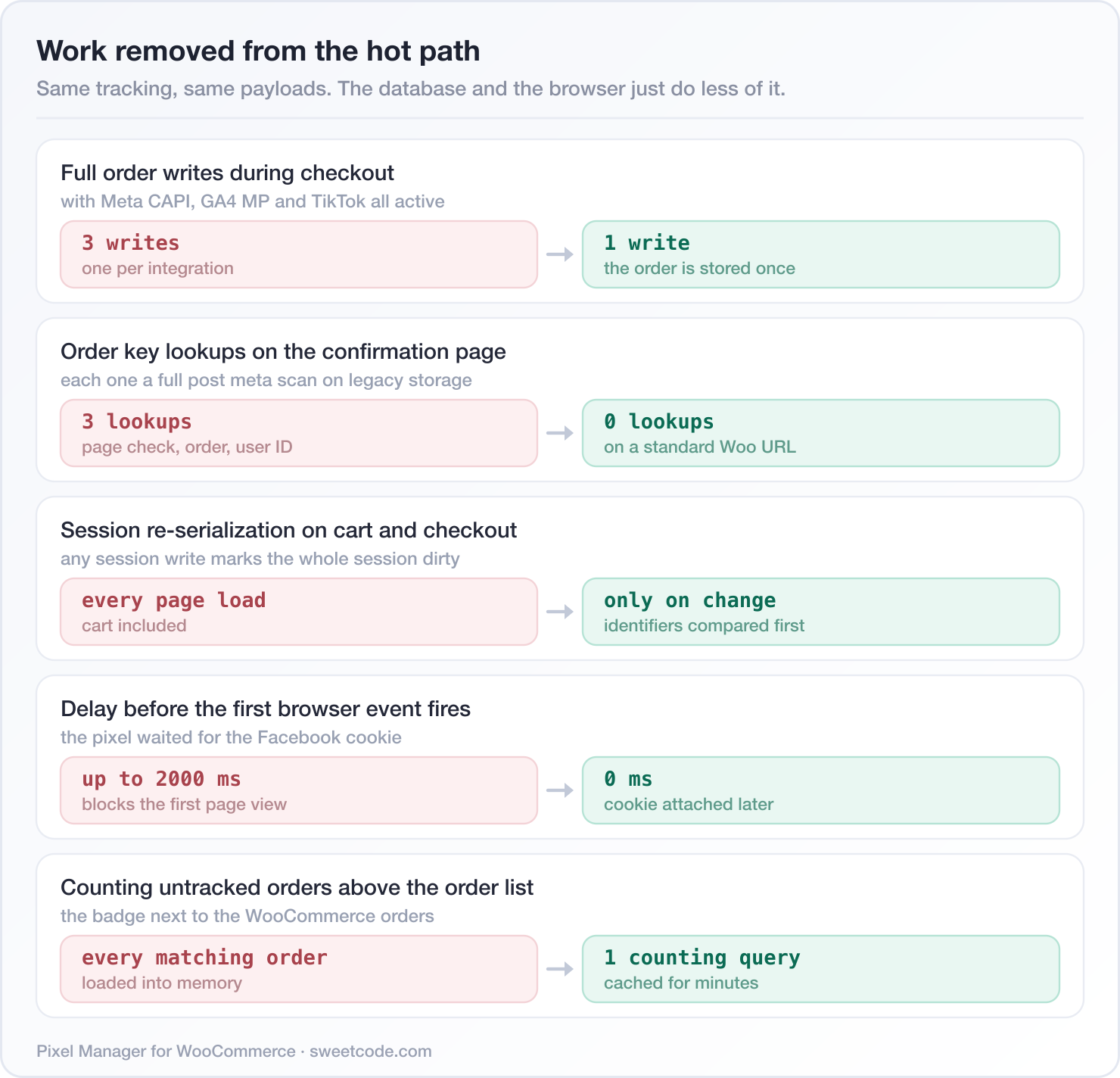
A few more from the same effort:
- Brands and categories are looked up once per product per request instead of repeatedly, which cuts queries most visibly on pages that list many products.
- The menu notification count is cached instead of being recalculated on every single admin page load, and its script and stylesheet only load on the two admin pages that can display a Pixel Manager notice.
- Tracking accuracy maintenance left the storefront: until the backfill had finished, every page view asked the Action Scheduler whether it was already queued. The table existence check no longer repeats within a request either.
- Cart fragment data is not output for excluded user roles, matching the gate the script bundle already followed.
- The LTV recalculation control tells the truth: the first click schedules the run for 2:00 AM so it stays out of your busiest hours, and while it is scheduled you can start it immediately or cancel it. The "Automatic LTV recalculation" setting was removed, because the background detection it described had been switched off for performance reasons long ago. Refunds and cancellations still update a customer's lifetime value automatically.
Meta Pixel Hygiene 🕵️
Meta has a talent for failing quietly, so 1.64.0 taught the Pixel Manager to notice and say something.
- Event Setup Tool detection: those point-and-click rules fire additional events without deduplication and mostly without values, which inflates event counts and corrupts purchase values. Active rules are now detected and flagged in the opportunities and the debug info.
- Restricted event categories: when Meta restricts events for a pixel because of its business category (health and wellness, for example), it silently drops them both in the browser and on the Conversions API, which looks exactly like a tracking failure. The restricted event names are now reported in the browser console and the debug info.
- A hijacked
fbq: if another script defineswindow.fbqbefore the Pixel Manager loads it, Meta's standard bootstrap never loadsfbevents.jsand the browser pixel silently stops tracking. That now produces a clear console warning. - Multiple Meta pixels: the
pmw_facebook_pixel_identifiersfilter sends every browser event to all configured pixels, and each additional pixel can carry its own Conversions API token, so server-side events including purchases and subscription lifecycle events reach every pixel, directly or through the proxy. - The Facebook Login ID (1.65.0) of customers who signed in with Facebook can now be sent with Conversions API events, which raises the event match quality score. It is read from the social login plugin your shop already runs.
Notable Bug Fixes 🐛
- Subscription renewals could fail (1.62.0): on shops with a persistent object cache such as Redis, creating a renewal order in the background could hit a fatal error while the Pixel Manager marked the new order for tracking, which in turn failed the scheduled renewal payment.
- The woocommerce.com Pro build served the free JavaScript bundle to the storefront (1.62.0), so Pro browser pixels silently did not fire even though the admin correctly reported Pro everywhere. The same build presented the Automatic Conversion Recovery columns as locked, and showed Pro pixels as locked (1.59.3), even though they are included.
- Turning off order duplication prevention overrode deliberate suppressions (1.65.0). It now waives the "already tracked" check and nothing else, so the
pmw_conversion_preventionfilter, failed, cancelled and refunded orders, and excluded user roles are respected again. - Orders referencing a deleted product no longer cost a pixel its whole event (1.65.1). The purchase reports the products that still exist and names the skipped line in the debug log.
- The cart fragment script created a JavaScript error when a consent tool blocked the data layer script or an HTML optimizer stripped it, and it was output twice per mini cart item on themes such as Flatsome.
- Product-level events from snippets and integrations always carry the shop currency now. Those events can be triggered with a raw
pmwDataLayer.productsentry, which holds none, and Meta rejects an amount without a currency outright. - Snippets reading the consent state inside the command queue work as documented. The queue ran before the consent module had loaded, so
pmw.consentdid not exist yet and every line after the consent check was skipped, which usually meant the integration's own event listener was never registered. - A changed Google tag or conversion ID took up to an hour to take effect (1.61.0), because the cached tag ID was not cleared on save.
- The Opportunities badge could show a count with no cards on sites in a language other than English (1.59.4), because the impact level was translated before it was compared. Opportunity cards also failed to render when an admin notice hider plugin was active.
- Removing the GA4 API secret and adding it back no longer sends the purchases paid in the meantime a second time (1.64.0).
- Orders that did not come from a Google Ads click no longer get an empty click ID written to them, which cost a full order save on every confirmation page (1.65.0).
- The Conversion Cart Data setting could not be saved on the free version (1.62.1) even though it is a free feature. The Meta Microdata output feature and its leftover setting were removed, since they no longer emitted any tracking code.
- The upgrade, trial and account links now lead to a working page even before the shop is connected and after a license expires (1.65.0), instead of a "you are not allowed to access this page" error. And the license upgrade page shows every tier again when opened in a background tab (1.65.1), which is what a middle click produces.
By the Numbers
Since development update #14 in April 2026:
- 17 releases (1.58.10 through 1.65.1)
- 27 new features
- 80 tweaks and improvements
- 70 bug fixes
- 8 new tracking platforms
- 4 new server-side conversion APIs (OpenAI, Nextdoor, Triple Whale Orders, Mixpanel Ingestion)
- 1 new pixel category (Attribution)
Already in Beta: What Comes Next 🔭
Version 1.65.2 is in beta while this goes out, and two items in it are worth knowing about early:
- The Microsoft Advertising Conversions API. With a token set, all Microsoft Ads events are also sent server-side, purchases included. The UET tag and the server events share one event ID so Microsoft deduplicates them, the
msclkidclick ID is attached for attribution, and the events route through SweetCode Cloud when it is connected. - Server-side Google Ads purchase uploads through Google's Data Manager API, as an experiment. It runs alongside the browser tag and deduplicates by transaction ID, so it only adds the conversions the tag missed.
Also in that release: the Opportunities tab learns to flag six more setups a shop is missing, among them the Pinterest API for Conversions, the Nextdoor Conversion API and the GA4 Measurement Protocol.
Get Started
Everything above is in 1.65.1. If you are on an older version, updating is the whole upgrade path.
Interested to get updates?
Sign up to our monthly newsletter today.Thank you for being part of the Pixel Manager community. A good share of this update exists because someone took the time to report a wrong number, name a plugin we had never heard of, or ask for a platform we had not built yet. Keep it coming.
Happy tracking! 🎯

